

Forex Flex EA running on MetaTrader 5 with Virtual Ghost Orders and real-time equity stop-loss tracking.
Known across the retail algorithmic trading community as one of the most flexible expert advisors ever built, Forex Flex EA departs from traditional rigid robots through its proprietary Virtual Trade Technology. In this detailed Forex Flex EA review, we unpack how ghost orders mitigate market timing errors, dissect the 12 built-in strategies, inspect multi-year verified Myfxbook live accounts, and configure safe parameters for FTMO and modern prop firm challenges.
Executive Verdict
The Bottom Line
Forex Flex EA is not an effortless "plug-and-play" toy for complete novices; it is a sophisticated algorithmic workbench. With proper configuration, disciplined risk settings (keeping lot sizes conservative), and low-latency VPS execution, its Virtual Trade Technology provides a quantifiable structural advantage over standard grid robots.
Virtual Trade Technology Explained
The primary algorithmic differentiator of Forex Flex EA is its patented Virtual Trade Technology. Standard expert advisors open a live market order the moment an indicator condition is met. If price subsequently retraces, the account immediately enters floating drawdown.
Ghost Order Initialization
Technical conditions are satisfied. Instead of placing a live market order, Flex initiates simulated ghost orders in MetaTrader memory.
Virtual Retracement Tracking
The EA monitors virtual price deviations. If the trade absorbs adverse movement, your live account balance remains at absolute zero risk.
Live Order Execution
Only when virtual positions absorb 6–10 pips of adverse movement and momentum stabilizes does the EA execute a live market trade at an optimal entry price.
12 Built-in Trading Strategies
Forex Flex EA is shipped with 12 distinct configuration presets. Users can toggle between strategies with a single dropdown selector in the EA inputs dialog:
Default (Flex)
Medium RiskThe classic flagship mode. Uses virtual trades to identify market inflection points before opening live recovery ladders.
SR (Support & Resistance)
Low–Medium RiskIdentifies horizontal price walls and institutional liquidity zones. Takes trades only after multi-touch confirmation.
TDI (Traders Dynamic Index)
Low RiskTrades volatility bands combined with RSI sentiment. Excellent for catching trend expansions on higher timeframes.
Big-T (Big Trend)
Medium RiskDesigned to ride extended trends on H1 charts with wider stop losses and trailing take-profit milestones.
HalfGrid
Medium–High RiskOpens grid orders in one direction only based on strong macro bias, avoiding dual-hedging drawdown traps.
Trend Mode
Low RiskZero grid multiplication. Enforces individual hard stop losses on every trade, tailored for prop firm strict rules.
Shotgun
High RiskRapid execution during market session openings. Designed for active accounts with high turnover targets.
ADR (Average Daily Range)
Low–Medium RiskMonitors daily exhaustion. Opens countertrend positions only when an asset reaches 120%+ of its historical daily range.
Verified Myfxbook Performance Analysis
Unlike unverified robots that rely on cherry-picked 90% MT4 Strategy Tester reports, Forex Flex EA maintains over a dozen publicly verified live trading accounts on Myfxbook. Here is what audited multi-year history demonstrates:
Forex Flex EA Myfxbook Accounts Showcase
Track records and trading privileges are verified directly by third-party auditor Myfxbook across multi-year real capital, virtual ghost trade hybrids, and MT5 candlestick scalping.
Flex EA Global DE TDI Slope
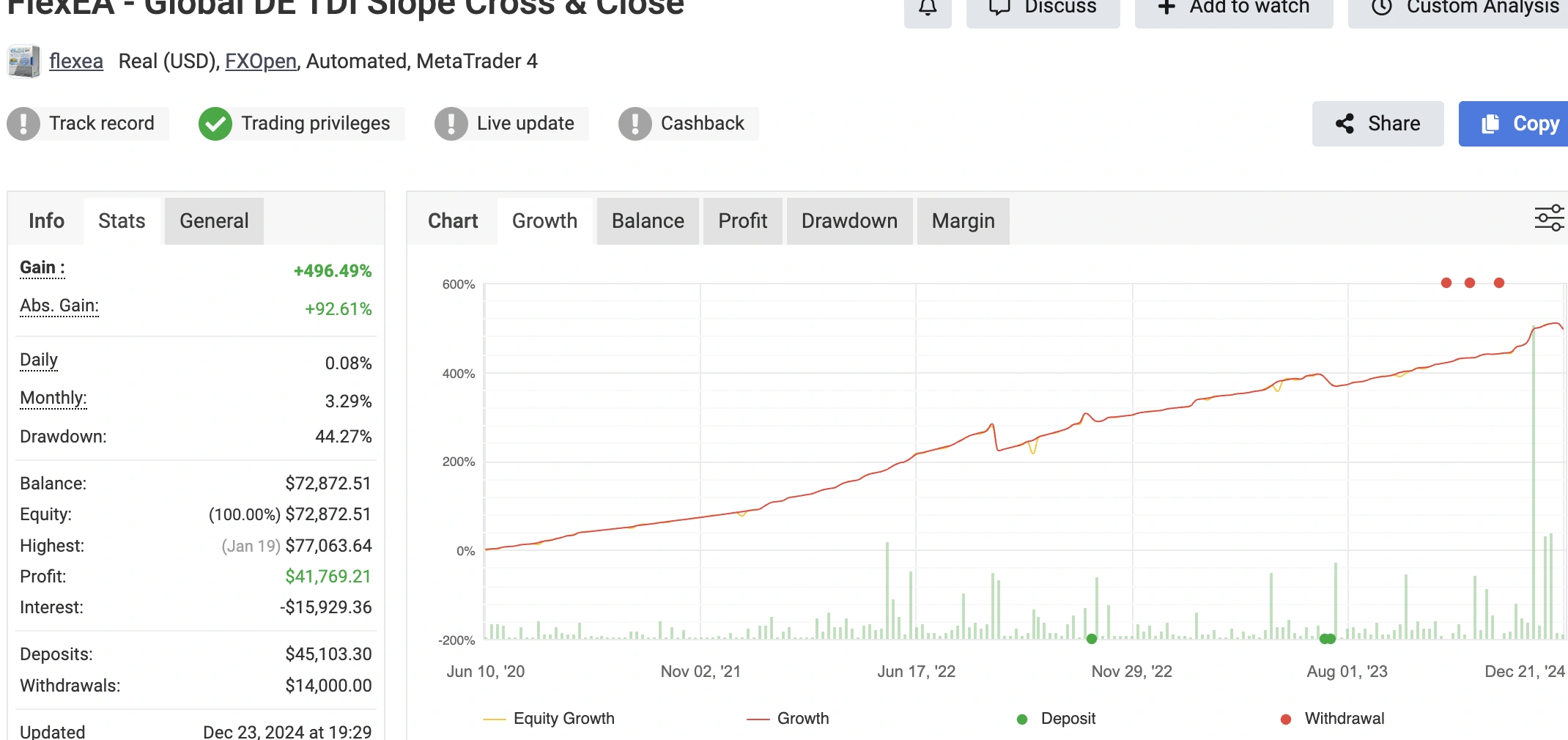
Official live real-money forward test active on FXOpen since June 2020. Generated over $41,760 in net profit with verified trading privileges and audited withdrawals.
Flex EA Trade SR Aggro
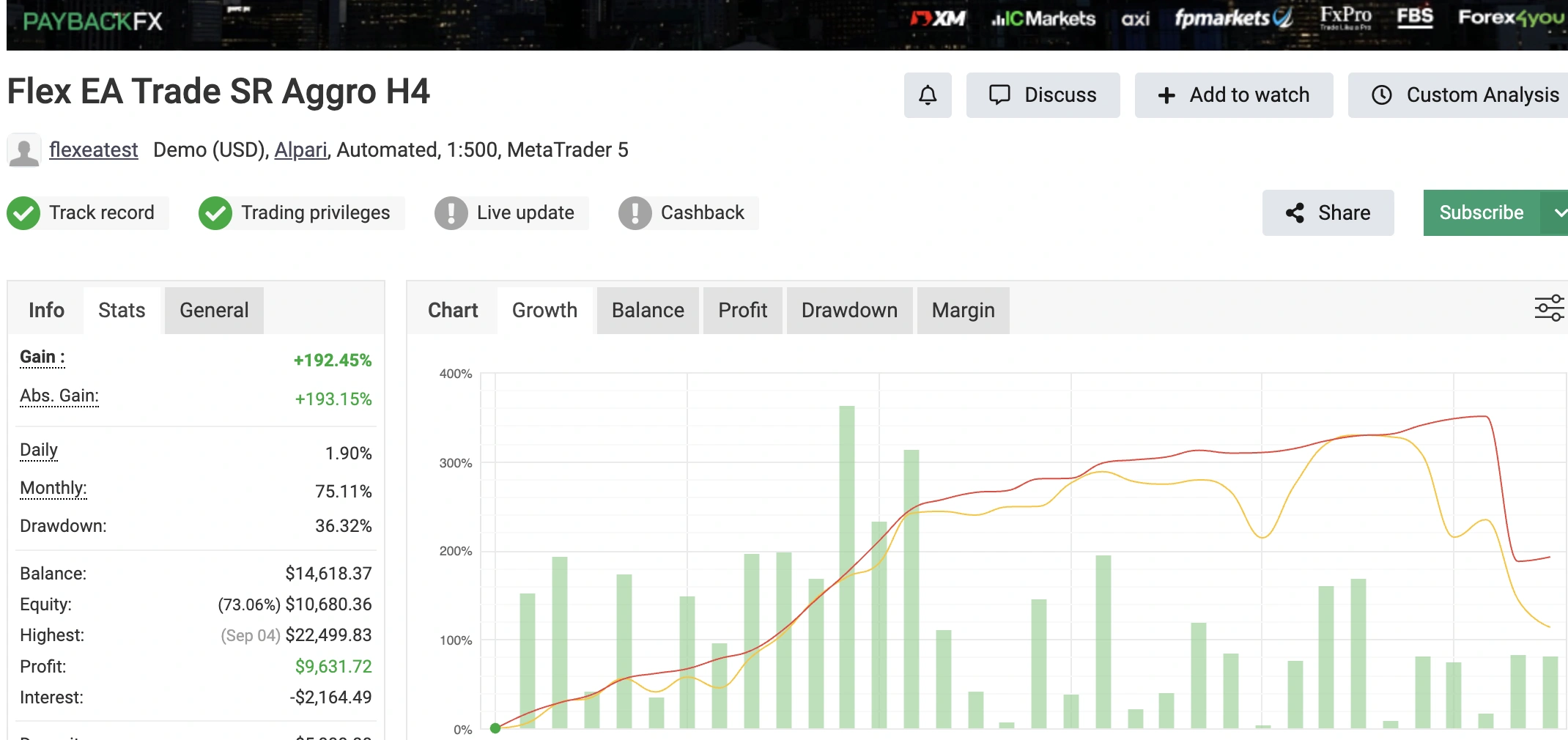
Features proprietary multi-timeframe candlestick pattern recognition on MT5. Rapid compounding momentum setup designed to exploit key support/resistance zones.
Flex EA Progressive FlexHybrid
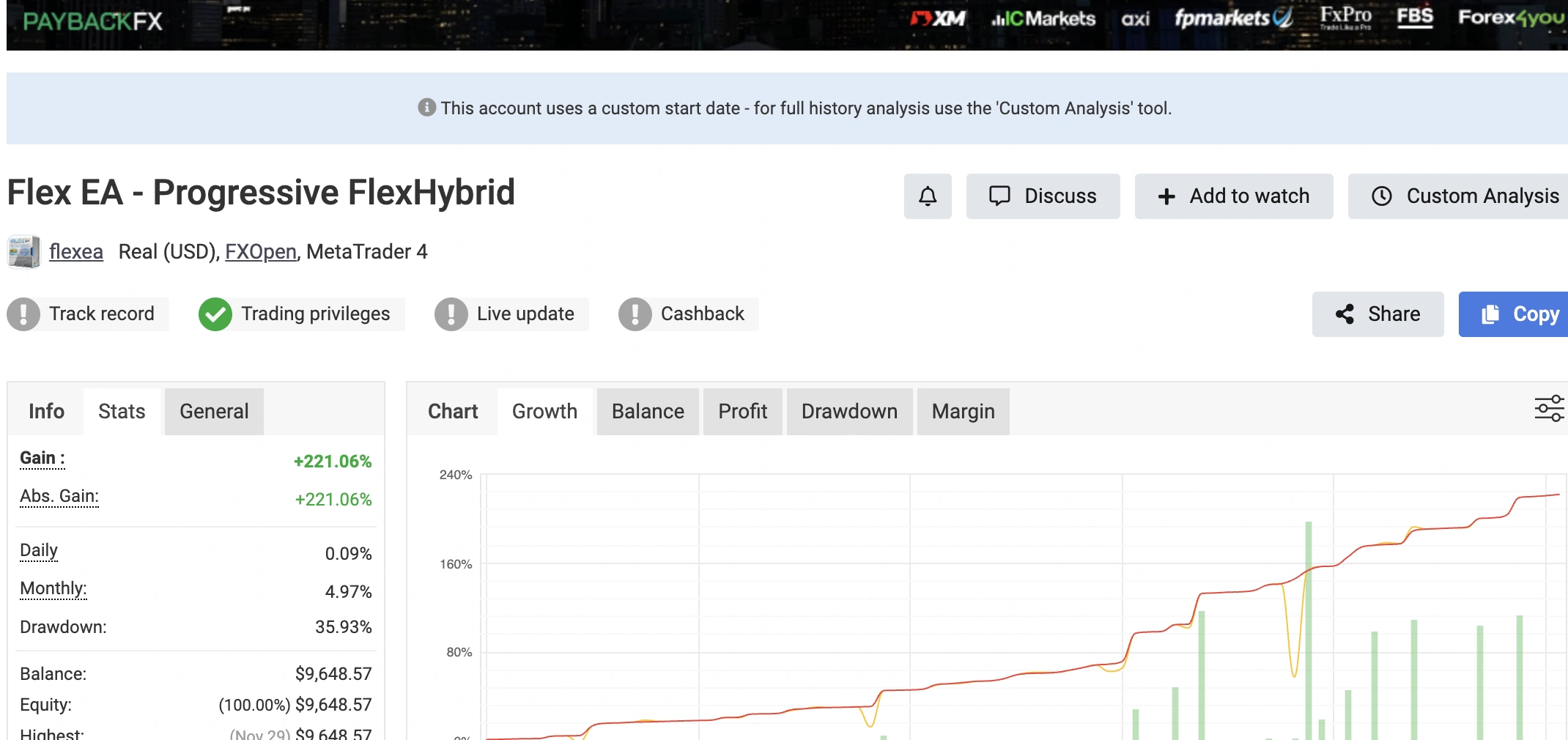
Employs Flex's core Virtual Trade Technology to delay real market execution until statistical market exhaustion. Verified trading privileges on FXOpen real account.
Flex EA EMA 12-50 Cross
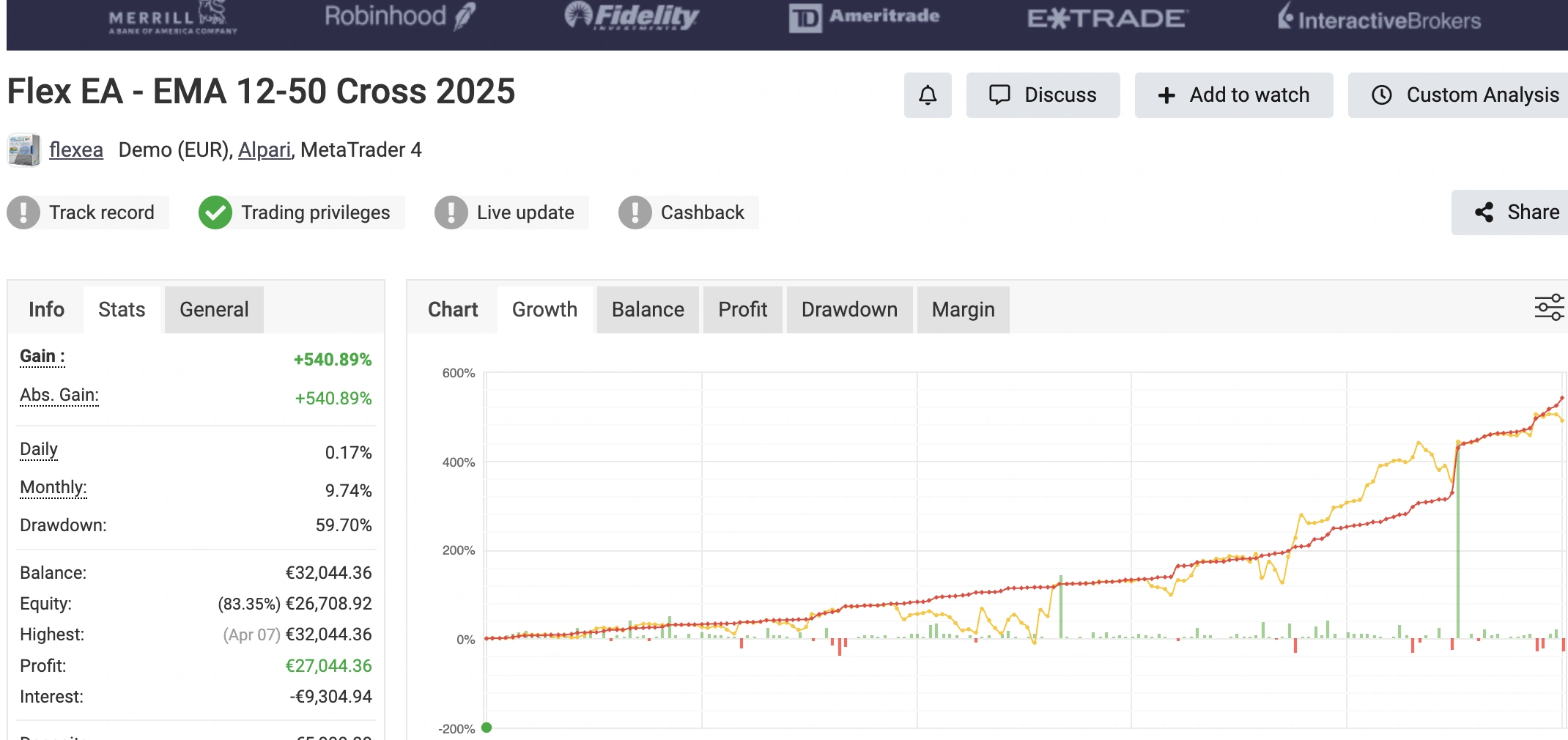
Dual moving average crossover strategy filtering high-momentum trending runs. Quadrupled initial capital to over €32,040 with automated trade management.
Prop Firm Setup: Passing FTMO & FundedNext
With the explosive popularity of proprietary trading firms, Forex Flex EA has been updated with specialized Prop Firm Protection Settings. Prop firms enforce strict maximum daily drawdown limits (usually 5%) and maximum total drawdowns (usually 10%).
1. Enforce Hard Equity Trailing Stops (`EquityTrailStop`)
Set `EquityTrailStop = true` with a 4.0% threshold. If adverse market volatility causes floating loss to touch 4.0% of starting daily equity, Flex EA closes all open orders immediately, preventing account disqualification.
2. Activate High-Impact News Filter
Set `NewsFilter = true`, pausing new trades 60 minutes before and 60 minutes after high-impact red-folder economic events (NFP, CPI, Interest Rate Decisions).
3. Cap Maximum Simultaneous Open Charts
Limit the EA to 2–3 non-correlated currency pairs simultaneously (e.g. EURUSD and USDJPY) to ensure margin allocation remains conservative.
Forex Flex EA Best Settings & Recommended Currency Pairs
Based on continuous forward testing and consensus from the official Forex Flex EA private forums, the following parameters produce the most stable Sharpe ratios:
| Parameter | Conservative Setup | Moderate Growth Setup | Prop Firm Challenge Setup |
|---|---|---|---|
| Pairs | EURUSD, GBPUSD | EURUSD, GBPUSD, AUDUSD, USDJPY | EURUSD only |
| Timeframe | H1 | M15 / H1 | H1 |
| Risk Mode | 0.5% per trade | 1.0% per trade | 0.25%–0.5% per trade |
| Virtual Trades Required | 8–10 trades | 6 trades | 10+ trades |
| Max Open Live Orders | 4 orders | 6 orders | 3 orders |
Forex Flex EA: Honest Pros & Cons
Key Advantages
- ✓Virtual Trade Technology substantially cuts down peak drawdown.
- ✓Includes 12 built-in strategies suited for different market regimes.
- ✓Extensive verified Myfxbook records with 6+ years of live history.
- ✓Active community forum sharing optimized .set presets constantly.
- ✓Single purchase includes lifetime licenses for both MT4 and MT5.
Potential Drawbacks
- ✕High complexity and learning curve with over 50 input parameters.
- ✕Default grid multipliers can cause heavy drawdown if unmanaged.
- ✕Requires 24/5 uptime on a low-latency VPS; cannot run on home PC.
- ✕Higher initial price point ($330) compared to budget bots.
Institutional Risk & Backtesting Protocols
Institutional Risk Management & Capital Preservation Protocol
Professional quantitative desks configure automated trading bots with strict risk thresholds to protect principal:
- Maximum 1% - 2% Risk Rule: Never allocate more than 1% to 2% risk of total account equity across simultaneous basket positions.
- Hard Equity Trailing Stops: Set hard daily stops at 4.0% to insulate accounts against flash-crash slippage and swap widening.
- Correlated Pair Avoidance: Avoid running identical grid modes on EURUSD, GBPUSD, and EURGBP simultaneously, which creates compounding currency exposure.
- High-Impact Economic News Awareness: Pause trading 60 minutes before and after major macroeconomic data releases (US NFP, CPI inflation, and FOMC rate cuts).
Strategy Backtesting & 99.9% Tick Data Protocol
Before deploying Forex Flex EA on a live funded account, run exhaustive historical validation:
- 99.9% Tick Data Modeling: Use high-precision tick history from reputable data feeds (such as Dukascopy or TrueFX) to eliminate artificial spread distortion.
- Variable Spread Inclusion: Backtest with realistic variable spreads and broker commission markups to simulate true real-world execution friction.
- Out-of-Sample Walk-Forward Optimization: Validate parameters on 70% in-sample data and verify robustness on 30% out-of-sample data to avoid curve-fitting.
- Monte Carlo Sequence Simulations: Run randomized trade order sequences to evaluate maximum drawdown risk under adverse market regimes.
Common MetaTrader Error Codes & Resolution Matrix
| Error Code | Description | Exact Resolution Action |
|---|---|---|
| ERR_INVALID_STOPS (130) | Stop Loss or Take Profit is inside broker stops level. | Verify broker freeze/stops level in symbol specifications and expand SL distance. |
| ERR_OFF_QUOTES (136) | Broker server has no available liquidity quotes. | Market is closed or experiencing extreme liquidity disruption during major news releases. |
| ERR_REQUOTE (138) | Price moved before order reached liquidity pool. | Increase slippage tolerance deviation parameter in your order execution settings. |
| ERR_TRADE_TIMEOUT (128) | Order request timed out waiting for server ack. | Check internet connection latency or migrate terminal to a dedicated trading VPS. |
VPS & Broker Requirements
Because Forex Flex EA calculates continuous tick updates across both virtual and live orders, your execution environment directly dictates net results.
Broker Requirements
- • True ECN or Raw Spread account with spreads < 0.3 pips on EURUSD.
- • 1:100 to 1:500 leverage (1:30 is usable but requires larger balance).
- • No restrictions on automated hedging or high-frequency order modification.
- • Fast market execution with minimal slippage during rollover hours.
Forex VPS Specs
- • Minimum 2 GB RAM and 2 vCPU cores to smoothly process multi-chart ticks.
- • SSD / NVMe drive for instant MetaTrader database indexing.
- • Equinix LD4 (London) or NY4 (New York) location matching broker servers.
- • Sub-1.5 ms execution latency to prevent requotes on fast reversals.
Step-by-Step Installation on MT4 & MT5
Download Official Files
Log into your Flex EA member dashboard and download the `.ex4` (for MT4) or `.ex5` (for MT5) files along with the latest community `.set` presets.
Place into Experts Folder
In MetaTrader, click File → Open Data Folder → MQL4 (or MQL5) → Experts and paste `ForexFlexEA.ex4`. Paste `.set` files into `Presets`.
Enable WebRequest & DLLs
Navigate to Tools → Options → Expert Advisors. Check `Allow automated trading`, `Allow DLL imports`, and add the license server URL to WebRequest.
Attach to Chart & Load Preset
Drag the EA onto your desired chart (e.g. EURUSD M15 or H1), click Load, choose your `.set` file, and ensure the smiling execution icon is active.
Forex Flex EA (Official v4.98 Build)
Version: v4.98Pricing: $330 (Lifetime)Active Users: 28,500+Compatibility: MT4 & MT5
Frequently Asked Questions: Forex Flex EA

Quantitative algorithmic trading research desk specializing in MetaTrader MQL4/MQL5 automated systems, institutional order book mechanics, and risk management tools.
High-Risk Investment Notice: Trading foreign exchange (Forex) and Contracts for Difference (CFDs) on margin involves high risk and may not be suitable for all investors. Leverage can work against you as well as for you, and you could sustain losses exceeding your initial deposits. Never invest capital you cannot afford to lose.
Automated Algorithmic Execution: Forex Flex EA operates according to mathematical models and predefined virtual trade retracement logic. Unanticipated market conditions, extreme volatility spikes, slippage, and spread expansion during economic news can result in substantial account drawdowns. Always backtest and run forward testing on demo accounts before committing live capital.
Past Performance & Third-Party Records: Historical results and third-party verified track records (including Myfxbook) are provided for analytical reference and do not guarantee future performance.
Independent Editorial Review: TraderSentiments provides software reviews, parameter guides, and market analysis for educational purposes only. This content does not constitute financial, investment, or trading advice.